
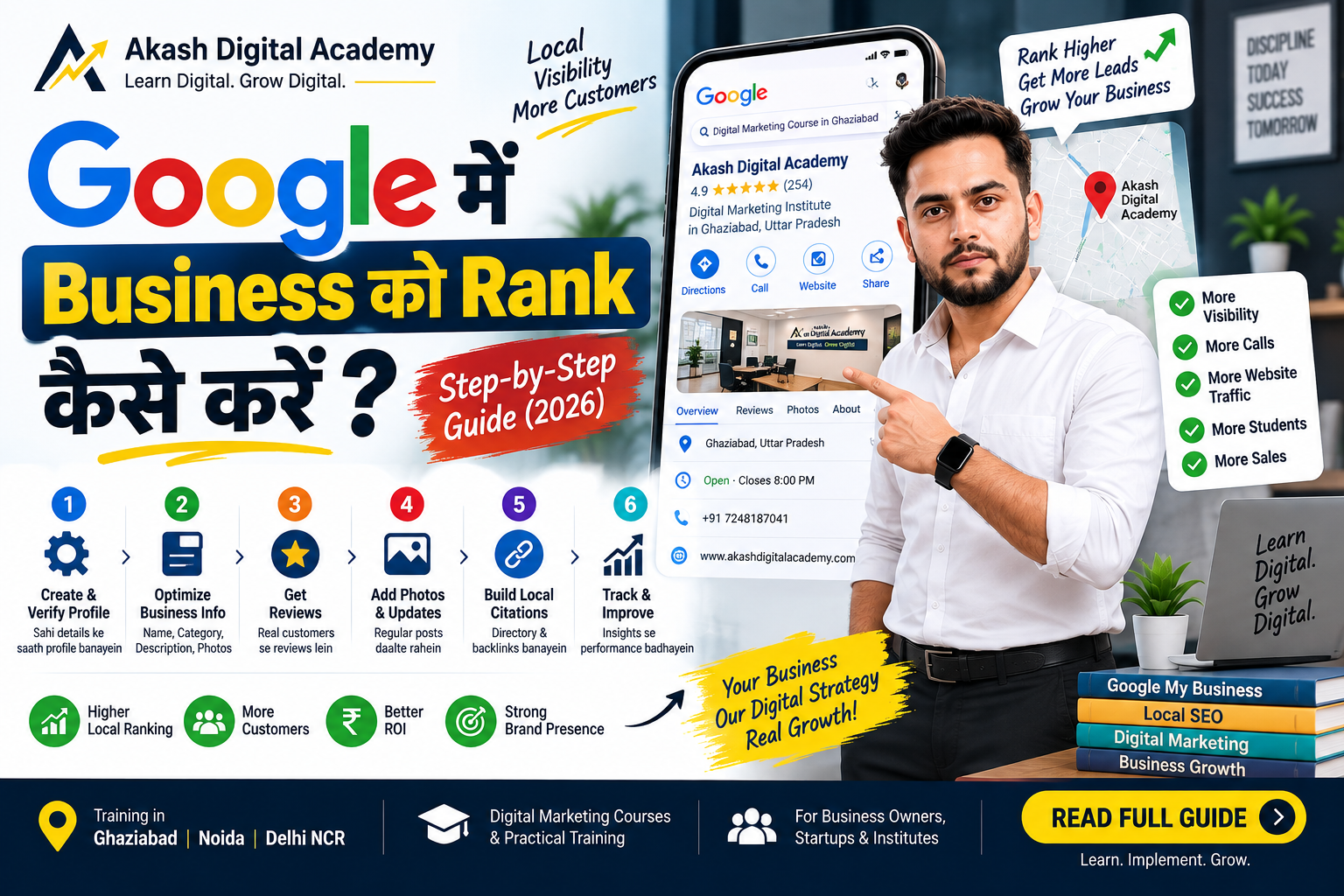
COMPLETE LOCAL SEO GUIDE 2026
Google Business Profile Kaise Banaye?
Complete Step-by-Step Guide 2026
Apne business ko Google Search aur Google Maps par list karne,
verify karne aur properly optimize karne ka practical Hindi guide.
Quick Answer:
Agar aap search kar rahe hain ki
Google Business Profile Kaise Banaye,
to sabse pehle Google Account se
Google Business Profile create ya claim karein.
Business ka exact name, correct category, location ya service area,
phone number, website, business hours aur relevant information add karein.
Uske baad Google ke available verification process ko complete karein.
Verification ke baad profile ko accurate information, photos,
services aur genuine customer reviews ke saath maintain karein.
-
Google Business Profile Kya Hai?
-
Google Business Profile Banane Ke Fayde
-
Google Business Profile Kaise Banaye?
-
Google Business Profile Verification Kaise Kare?
-
Google Business Profile Optimize Kaise Kare?
-
Google Business Profile SEO & Local SEO
-
Common Google Business Profile Mistakes
-
Google Business Profile Checklist
-
Frequently Asked Questions
Google Business Profile Kya Hai?
Google Business Profile Google ka business listing
platform hai jiske through eligible businesses apni information
Google Search aur Google Maps par manage kar sakte hain.
Pehle ise commonly
Google My Business ya GMB kaha jata tha.
Isliye users aaj bhi
Google My Business Kaise Banaye,
GMB Profile Kaise Banaye aur
Google Maps Par Business Kaise Add Kare
jaise queries search karte hain.
Profile mein business name, category, address ya service area,
phone number, website, opening hours, photos, services aur
customer reviews jaise important details manage ki ja sakti hain.
Google ke official documentation ke according business ko add ya claim
karne ke baad verification process complete kiya jata hai. :contentReference[oaicite:1]{index=1}
Google Business Profile Banane Ke Fayde Kya Hain?
Agar aapka business local customers ko products ya services provide
karta hai, to Google Business Profile aapki local online presence ka
important part ban sakta hai.
Customers aapke business ko relevant Google Search aur Maps
experiences mein discover kar sakte hain.
Address, phone, website aur working hours jaise details provide
ki ja sakti hain.
Available profile features ke through customers business se
contact ya directions access kar sakte hain.
Accurate Business Profile information local search presence
ko support karti hai.
Google ke local ranking guidance ke according relevance,
distance aur prominence local results mein important factors hain.
Isliye sirf profile banana hi enough nahi hai; business information
ko accurate aur complete rakhna bhi important hai. :contentReference[oaicite:2]{index=2}
Google Business Profile Kaise Banaye? Step-by-Step Process
Ab main practical process explain karta hoon ki
Google Business Profile Kaise Banaye
aur Google par apne business ko properly add karne ke liye
kaunse steps follow karne chahiye.
Google Account Se Login Karein
Sabse pehle ek Google Account se sign in karein.
Business Profile manage karne ke liye wahi account use karein
jiske through aap business ko manage karna chahte hain.
Official Google Business Profile setup page:
Google Business Profile
Business Ko Google Par Add Ya Claim Karein
Agar aapka business Google Search ya Maps par existing profile
ke form mein nahi hai, to naya Business Profile add kar sakte hain.
Agar listing already exist karti hai, to eligible case mein
usse claim karne ka process follow karein.
Google ke official instructions ke according new business ke liye
Add your business to Google option use kiya ja sakta hai. :contentReference[oaicite:3]{index=3}
Business Name Sahi Enter Karein
Business name wahi use karein jo real world mein aapke business
ko represent karta hai. Sirf ranking improve karne ke liye
business name mein unnecessary keywords add karna avoid karein.
Example:
Aakash Digital Academy
Correct Business Category Select Karein
Apne business ke liye sabse relevant primary category choose karein.
Category Google ko aapke business ke nature ko understand karne mein
help karti hai.
Category choose karte waqt sirf popular category select karne ke
bajay apne actual business se relevant category choose karein.
Business Location Ya Service Area Add Karein
Agar customers aapke physical location par visit karte hain,
to eligible business address add karein.
Agar aap customers ko unke location par service dete hain,
to applicable service-area setup use kiya ja sakta hai.
Google ke address guidance ke according business information
accurate honi chahiye aur address Google ke guidelines ke
according hona chahiye. :contentReference[oaicite:4]{index=4}
Phone Number Aur Website Add Karein
Business ka correct contact number aur website URL add karein.
Ye information customers ko business ke saath connect hone
mein help karti hai.
Business Verification Complete Karein
Google aapke business ke liye jo verification option available
karaye, uske according verification complete karein.
Verification method har business ke liye same hona zaroori nahi hai,
isliye Google Business Profile mein available instructions ko follow
karna important hai.
Profile Complete Aur Update Rakhein
Verification ke baad business hours, services, description,
photos aur other relevant details complete karein.
Google ke official guidance ke according complete aur accurate
business information local search visibility ko support karti hai. :contentReference[oaicite:5]{index=5}
Google Business Profile Verification Kaise Kare?
Google Business Profile Verification ka purpose
business information ko establish karna aur business management
access ko confirm karna hai.
Verification options Google aapke business/profile ke context ke
according provide kar sakta hai. Isliye har business ko exactly
same verification method milna zaroori nahi hai.
Important:
Verification ke time fake information, incorrect address ya
misleading business details use na karein. Hamesha actual business
information aur Google ke current instructions follow karein.
Google Business Profile Help par current verification guidance
check kar sakte hain:
Official Google Business Profile Help
Google Business Profile Optimize Kaise Kare?
Google Business Profile Setup ke baad next step
profile optimization hai. Optimization ka matlab keyword bharna nahi,
balki profile ko accurate, complete, useful aur customer-friendly
banana hai.
1. Business Information Accurate Rakhein
Business name, address, phone number, website aur operating hours
ko regularly check karein.
2. Relevant Business Category Use Karein
Primary category actual business activity se relevant honi chahiye.
Additional categories agar available aur relevant hon to unhe bhi
carefully select karein.
3. Business Description Useful Banayein
Business description mein clearly explain karein ki business kya
karta hai, kis type ke customers ko serve karta hai aur uski
important services kya hain.
Natural language use karein. Unnecessary keyword repetition
Google Business Profile SEO nahi hai.
Google ke official documentation ke according Business Profile
description potential customers ko business aur uski uniqueness
samajhne mein help karti hai. :contentReference[oaicite:6]{index=6}
4. High-Quality Real Photos Upload Karein
Business location, team, products, services, interior/exterior aur
other relevant business photos upload karein.
Google ke photo guidelines ke according images clear, well-lit aur
business ko accurately represent karni chahiye. :contentReference[oaicite:7]{index=7}
5. Services Add Karein
Agar profile mein services add karne ka option available hai,
to actual services ko clearly list karein. Service names ko
unnecessarily keyword-stuffed na banayein.
6. Genuine Customer Reviews Encourage Karein
Real customers se genuine feedback maangna useful hai.
Fake reviews, purchased reviews ya manipulated reviews se bachna chahiye.
7. Reviews Ka Professional Reply Dein
Positive aur negative reviews dono ka professional aur helpful
response business trust ko improve kar sakta hai.
8. Profile Information Updated Rakhein
Agar business hours, phone number, website, services ya location
information change hoti hai, to profile ko accordingly update karein.
Google Business Profile SEO Aur Local SEO Kaise Kare?
Google Business Profile SEO ko Local SEO strategy
ka ek important part samjha ja sakta hai. Lekin local visibility
sirf profile ke keywords par depend nahi karti.
Google ki official local ranking guidance ke according local results
mein primarily relevance, distance aur prominence
jaise factors consider kiye jaate hain. :contentReference[oaicite:8]{index=8}
Local SEO Ke Important Areas
- Accurate Google Business Profile information
- Relevant business category
- Correct location/service area
- Complete business information
- Relevant and genuine reviews
- Useful business photos
- Consistent website information
- Local content and location relevance
- Quality local citations where appropriate
- Technically healthy business website
Isliye agar aapka goal hai
Google Maps Ranking Kaise Badhaye,
to sirf profile create karke chhodne ke bajay complete
Local SEO ecosystem par kaam karna better approach hai.
Related SEO Guides
Agar aap Google Business Profile ke saath website SEO aur Local SEO
bhi seekhna chahte hain, to ye related guides dekhein:
Google Business Profile Banate Time Common Mistakes
Business name mein unnecessary keywords add na karein.
Sirf high-volume category ke liye irrelevant category select na karein.
Business location ko accurately represent karein.
Reviews ko manipulate ya purchase karne ki koshish na karein.
Same business ke unnecessary duplicate profiles create na karein.
Important information ko updated aur useful rakhein.
Google Business Profile Checklist
Profile publish/verification ke baad ye checklist quickly review karein:
- ✓ Correct business name
- ✓ Correct primary category
- ✓ Correct address or service area
- ✓ Correct phone number
- ✓ Website URL added
- ✓ Business hours updated
- ✓ Business description completed
- ✓ Logo added where appropriate
- ✓ High-quality business photos uploaded
- ✓ Relevant services added
- ✓ Genuine customer reviews encouraged
- ✓ Customer reviews answered professionally
- ✓ Profile information regularly checked
Official Google Resources
Google Business Profile setup aur management ke liye official
resources ko priority dena best practice hai.
Frequently Asked Questions – Google Business Profile
Google Business Profile Kaise Banaye?
Google Account se Google Business Profile setup start karein,
business ko add ya claim karein, correct name/category/location
details provide karein, available verification process complete
karein aur profile information ko properly maintain karein.
Google Business Profile Free Hai Kya?
Google ke official help documentation ke according eligible
businesses apna Business Profile add ya claim free of charge
kar sakte hain. :contentReference[oaicite:9]{index=9}
Google My Business Kaise Banaye?
Google My Business purana commonly used name hai; current product
terminology Google Business Profile hai. Isliye
Google My Business Kaise Banaye search karne wale users ko
bhi current Google Business Profile setup process follow karna chahiye.
Google Maps Par Business Kaise Add Kare?
Google Business Profile ke through eligible business ko add ya
claim kiya ja sakta hai. Google ke instructions ke according
business information enter karke verification process complete
karein. :contentReference[oaicite:10]{index=10}
Google Business Profile Verification Zaroori Hai?
Google ke according Search aur Maps par business information
properly show karne ke liye business ko add/claim karke
verification process complete karna important hai. :contentReference[oaicite:11]{index=11}
Google Business Profile Mein Photos Kaise Add Kare?
Google Search ya Maps se apne Business Profile ko manage karke
available Photos option ke through relevant business photos
add ki ja sakti hain. Google clear, well-lit aur representative
photos recommend karta hai. :contentReference[oaicite:12]{index=12}
Google Business Profile SEO Kaise Kare?
Accurate business information, relevant category, correct location,
useful description, genuine reviews, quality photos, services,
updated hours aur overall Local SEO consistency par focus karein.
Keyword stuffing ko optimization na samjhein.
Google Maps Ranking Kaise Badhaye?
Local ranking ko improve karne ke liye complete aur accurate
Business Profile maintain karein, relevance improve karein,
business information updated rakhein aur genuine customer
trust signals build karein. Google local results mein
relevance, distance aur prominence ko consider karta hai. :contentReference[oaicite:13]{index=13}
Conclusion: Google Business Profile Kaise Banaye?
Ab aapko clear idea mil gaya hoga ki
Google Business Profile Kaise Banaye aur
setup ke baad profile ko kaise maintain kiya ja sakta hai.
Basic process mein business add ya claim karna, correct business
information provide karna, relevant category select karna,
location/service area set karna aur available verification
complete karna important steps hain.
Lekin long-term local visibility ke liye profile ko complete,
accurate aur customer-focused rakhna equally important hai.
Google ke official guidance ke according local search mein
relevance, distance aur prominence important considerations hain. :contentReference[oaicite:14]{index=14}
Agar aap Google Business Profile ke saath
Local SEO, Website SEO, Google Ads aur Digital Marketing
bhi systematically seekhna chahte hain, to
Aakash Digital Academy ke learning resources explore kar sakte hain.
Apne Business Ko Google Par Better Visibility Dein
Google Business Profile, Local SEO, SEO, Google Ads aur
Digital Marketing ko practical projects ke through seekhein.